Bot clicks in paid traffic: how to find them and get credit from the ad platform
Some of the clicks you pay for never behave like a person once they land. Here is how to tell which ones, what evidence an ad platform will look at, and what an accepted claim actually gets you.
- The platform’s filters are the first screen, not the last. Google removes the invalid clicks it catches before billing; what slips through shows up on your site as paid visits with no human behaviour, and the only place to see those is your own traffic data.
- A claim needs click-level evidence. Google asks for the click id, time, IP address and device of each suspicious visit, filed within 60 days of the activity. Aggregates and screenshots of a spike do not qualify.
- An accepted claim is a credit, not a refund. The platform decides, the usual outcome is a credit on a later invoice, and no evidence file guarantees one. The bot screen can also flag a real person, so you review before you send.
- The second cost is a wrong CPA. Non-human clicks sit in the denominator of every platform report, so the human-only CPA is the number to optimise and to put in front of a client.
Lunio’s Global Invalid Traffic Report 2026, built on 2.7 billion paid clicks between August 2024 and July 2025, puts the invalid share of paid traffic at 8.51% across the six platforms it measured, with Google Ads at 7.57%, Meta at 8.20% and Bing at 10.32%. The platforms filter part of that before you are billed; the part they miss lands on your site, loads the page, and never does anything a person would do. You can ask for that money back, but only with click-level evidence, only within the platform’s look-back window, and only as a credit the platform decides to grant.
This article covers the two kinds of non-human paid visit, what Google’s investigation asks for, what the result does to the CPA you report, and how an agency puts it in a client report without promising money the platform has not agreed to. The waste is measured against the two events paid traffic is bought for, a purchase or a lead.
What a bot click costs you twice
A non-human click costs you the click price once and then costs you again in every number built on top of it. At the $5.42 average search CPC in WordStream’s 2026 Google Ads benchmarks (13,474 US search campaigns, April 2025 to March 2026), 800 non-human clicks in a 10,000-click month is $4,336 that could never have produced a purchase or a lead. The quieter cost is that those 800 clicks sit in the denominator of your conversion rate, feed the bidding algorithm the same signals as real visits, and make every CPA you report wrong in the same direction.
Google’s About invalid traffic page says automated filters, machine learning and manual reviews remove invalid traffic before billing, that you are not charged for what is caught, and that anything found after billing comes back as a billing adjustment. What that leaves is the traffic the filters did not catch. The platform cannot see what a visit did after the click; your site can. That asymmetry is the whole method.

Two framings to avoid. Do not read the 8.51% as your number: it is an average across platforms, industries and ten countries, measured by a vendor that sells invalid traffic protection. And do not assume the platform has handled it. Google filters what it detects; the clicks it does not detect are by definition not in the “Invalid clicks” column of your campaign report.
Below a few thousand paid clicks a month the non-human share is too small in absolute terms to justify the filing work: 8% of 1,500 clicks is 120 clicks. Measure it and exclude it from your reporting; file only when the credit would matter.
The two kinds of non-human paid visit
Non-human paid traffic arrives in two forms, and they need different handling because the evidence for each is different. The first is the hit that never becomes a visit: the request is rejected at the door by a bot screen on your side because the user agent, request pattern or fingerprint matches known automation. The second is the visit that loads the page and stops: no scroll, no pointer movement, no second page, then gone. The platform billed both. Only the second looks like a visitor in your analytics until you look at behaviour.
The distinction matters because the platform will not accept your opinion that a click was invalid. It wants the GCLID of each click, the time, the IP address, the device, and a reason the traffic is suspicious. A rejected hit gives you the click id and the rejection; an idle visit gives you the click id and a behaviour record. A spike in a chart gives you nothing the reviewer can use.
How this works in practice
Pathmonk’s analytics include a view called Paid clicks quality that does this split. Every visitor whose first visit came from a paid click is divided into the hits rejected by Pathmonk’s bot screen and the visitors who loaded the page but never showed human behaviour, by source and campaign. It is the same bot detection that keeps non-human traffic out of the 50/50 control test, so experiences, experiments and this view count the same real visitors. The view gives you the evidence; it does not decide any credit, and because the bot screen can produce false positives the next step is a review, not a filing.
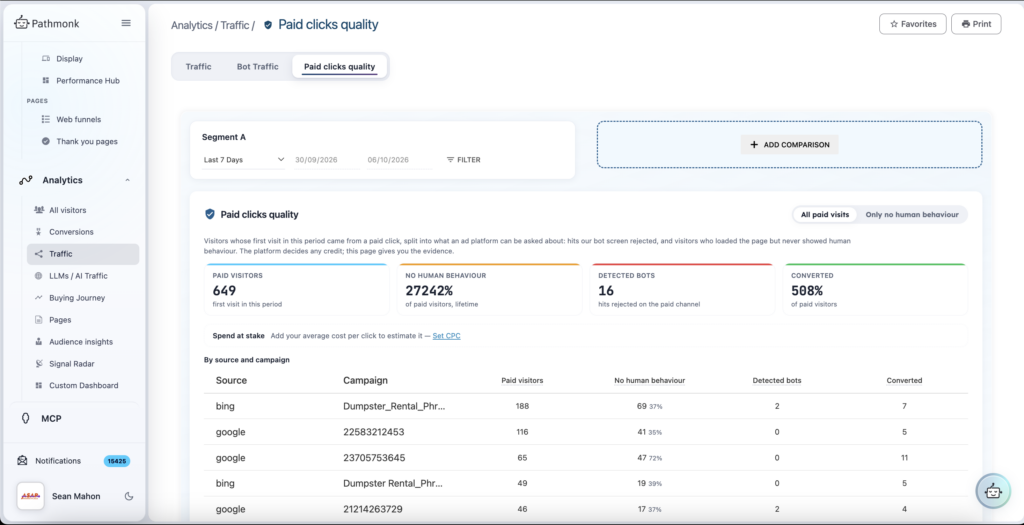
Common mistake: treating every zero-engagement paid visit as a bot. A slow connection, a background tab or a browser that blocks scripts all look idle to a behaviour check. The share that matters is idle and clustered: the same IP ranges, device signature, seconds of the day, campaign. That pattern is what the platform’s reviewers can act on; a lone idle visit is not.
Building the evidence file and filing the investigation
Google’s investigation request has a fixed shape, and the evidence has to match it field by field. The About invalid traffic page (read 26 October 2026) lists what the specialists want: customer ID, exact date range, campaign and ad group names, suspicious keywords, web server logs with the IP addresses, device information and GCLIDs of the suspicious clicks, and a short explanation of why the traffic is suspicious. Half of that lives in the ad account and half on the website, which is where most teams get stuck.
| Field Google asks for | Why the reviewer needs it | Where it comes from |
|---|---|---|
| Customer ID and date range | Scopes the review to one account and a window inside the last 60 days | The Google Ads account |
| Campaign, ad group, keywords | Narrows the clicks to the placements where the pattern shows | The Google Ads account, matched to the source and campaign split on your site |
| GCLID per suspicious click | Maps each visit back to one ad interaction; without it a visit cannot be tied to a billed click | The landing URL of each paid visit, recorded on your site at first touch |
| Time, IP address, device | Lets the reviewer see repetition and clustering across clicks | Your web server logs or your analytics, if they keep the request data |
| What the visit did | Your reason the traffic is suspicious: loaded and idle, rejected, no second page | Your own behaviour data; the platform never sees it |
| Trend explanation | A short statement of the anomaly, for example clicks outside targeted locations or a spike with no conversions | You write it from the two sources above |
The sequence:
- Pull the paid visits for the window from your own data, split into rejected hits and idle visits, by source and campaign. Keep the human visits out of the file.
- Review the idle list for false positives: visits that converted later, known staff or agency IPs, lone idle visits with no clustering.
- Decide what to send. The file contains IP addresses, which are personal data, so what goes to the platform is a decision for you and your legal team, not a default.
- Add the “Invalid clicks” column in Google Ads and note what Google already filtered for the window. Your file is about the remainder.
- Submit through the Click Quality Form inside the 60-day window. Google says the review takes several business days, findings arrive by email, and it notifies you of any credit if the filters missed something.
- Record the outcome against the campaign and window. A credit appears as a billing adjustment on a later invoice, and the reporting in section four needs it.
In Pathmonk, the file assembly is done by Claim packs. For each platform (Google Ads, Microsoft Ads, Meta and other networks) it prepares a downloadable log with the click id, time, IP and what each visit did, plus the steps to file an invalid clicks investigation, for example from your Google Ads account. Pathmonk gives you the evidence; the platform decides any credit, and when a claim is accepted the usual outcome is a credit on a later invoice, never a refund. Because the files contain IP addresses, which are personal data, you decide what you send.

The platform cannot see what a visit did after the click; your site can.
What non-human clicks do to the numbers you report
The waste is in the spend, so the CPA you report is a true cash number; what it hides is how much of that cash bought nothing. Take a lead-generation campaign with 10,000 clicks in a month at $4.00, so $40,000, producing 250 leads Hypothetical example. Reported CPA is $160, reported conversion rate 2.50%. Now suppose your own data shows 8% of those clicks, 800, were rejected or loaded the page and never moved. They cost $3,200 and could not have produced a lead.
The human-only view is 9,200 clicks for $36,800 and the same 250 leads: a CPA of $147.20 and a conversion rate of 2.72%. The reported figures are not wrong, they are the invoice. But three decisions run off the human-only ones. The bidding target: real people convert at 2.72%, and an algorithm fed 2.50% is told the page is worse than it is. The benchmark: against the 8.18% average conversion rate in WordStream’s 2026 benchmarks, the gap is smaller than it looks. And the claim: $3,200 is the ceiling of what an investigation of that month could credit, before Google removes what its filters already caught and decides what it accepts.
For an online store the same arithmetic runs on purchases and revenue per paid visitor: revenue divided by human visits rises when the idle visits come out, and that is the number to put against the CPC. Either way, carry the reported CPA and the human-only CPA on every report with the non-human share between them, so nobody reads a change in one as a change in the other.
In Pathmonk, paid spend, conversions and cost per acquisition per campaign are read in the same analytics as every other channel, against the same goals, and the bot screen behind Paid clicks quality keeps non-human visits out of the 50/50 control, so the human-only CPA and the personalisation lift are measured on the same real visitors. For context, across the customers in the PPC case study the average reduction in acquisition cost was 31% in the first month against the month before install, measured in their own ad accounts and Pathmonk analytics. That figure comes from campaign and page work as a whole, not from click claims.
For agencies: putting it in the client report
An agency that reports the platform’s CPA is reporting the platform’s version of its own work, and a client who finds the non-human share first will read every earlier report as inflated. Be the one who found it: add the non-human share by platform and campaign, the human-only CPA next to the reported CPA, and a claims line with the outcome when the platform answers.
The wording on claims is where agencies get into trouble. A claim pack is evidence the agency assembled; it is not a credit, and the report never books one until the billing adjustment appears on the invoice. Write “filed, $3,200 of clicks in question, outcome pending”, then “credited $X on the invoice of date” or “no credit granted”, and nothing in between. The client’s finance team reconciles the invoice, not the report, and the two have to agree.
For an agency running several platforms per client, the constraint is producing this for every account every month without a day of exports. The case study’s education customer, Dominie, briefed, produced and measured campaigns on four platforms from one board from week one; the per-platform claim packs and the human-only figures come from the same board, whichever network the clicks came from. State to the client what Pathmonk does not do as well: it does not file the claim, decide it, or promise the result.
What this does not do
Four hard limits, which any report on this should state.
The bot screen can produce false positives. A behaviour check reads absence of signals, and a real visitor can be silent. Review the idle list before it goes anywhere, and expect the reviewers to discount part of it. The platform decides. Google says the investigation uses the GCLIDs and IP addresses you send to assist the review, will not confirm whether specific clicks were valid or invalid, and notifies you of any credit if the filters missed something. No evidence file obliges a credit. A credit is not a refund. An accepted claim is a billing adjustment on a later invoice, and nothing older than 60 days is reviewed. IP addresses are personal data. What leaves your systems is a decision for you and your legal team, and sending everything is not the right default for every company.
None of that argues against measuring. The non-human share belongs in your reporting whether or not you file, because the human-only CPA is the number bidding, benchmarking and budget decisions run on. Filing is the optional second step. The sibling piece on AI agents clicking ads covers the newer automated visitor the same checks have to catch, and the hub on why conversion rate lowers CPL and CPA covers what to do with the human visits once the count is honest.
Key takeaways
- A non-human click costs the click price once and then distorts every conversion rate and CPA built on top of it. Both costs are measurable on your own traffic.
- Lunio’s 2026 report puts the invalid share of paid traffic at 8.51% across six platforms. Treat it as a reason to measure your own share, not as your number.
- The platform filters what it detects before billing. What it misses lands on your site, loads the page and never behaves like a person; only your side of the click can see that.
- Two kinds of non-human visit: rejected by the bot screen, or loaded and idle. Each is usable evidence with its click id, time, IP, device and what the visit did.
- Google’s investigation covers the last 60 days, takes several business days, and does not tell you which clicks were judged invalid. File on a rolling basis.
- An accepted claim is a credit on a later invoice, never a refund, and the platform decides. Book nothing until the billing adjustment appears.
- Carry reported CPA and human-only CPA side by side on every report, with the non-human share between them. Decisions run on the human-only figure.
- Review the idle list for false positives, and decide deliberately what to send: the file contains IP addresses, which are personal data.
FAQs on bot clicks in paid traffic
Can I get a refund from Google Ads for bot clicks?
No. Google removes the invalid clicks it detects before billing, and if it finds invalid activity after you were billed it issues a credit as a billing adjustment on a later invoice. An invalid traffic investigation you file can lead to a credit if the reviewers find traffic the filters missed, but the platform decides, and the outcome is never money returned to your account.
How far back can an invalid clicks investigation go?
Google limits investigations to activity within the last 60 days, so the evidence file has to be assembled on a rolling basis. Clicks older than that stay billed; you can still exclude them from your own reporting, but there is nothing to file.
What evidence does Google ask for in a click quality investigation?
Your 10-digit customer ID, the exact date range, the campaign and ad group names, the suspicious keywords, web server logs with the IP addresses, device information and GCLIDs of the suspicious clicks, and a short explanation of why the traffic is suspicious. For invalid leads, a spreadsheet of GCLIDs with your assessment of each lead.
How do I tell a bot visit from a real visitor who just bounced?
By behaviour and clustering together. A single idle visit with no scroll, no pointer movement and two seconds on page can be a real person with scripts blocked or a background tab. The usable signal is idle visits that cluster: the same IP ranges, device signatures, seconds of the day or campaign. Review the list for false positives before you send anything.
Does the “Invalid clicks” column in Google Ads already show everything?
It shows the clicks Google’s systems already filtered and did not charge you for. By definition it does not include the clicks the filters missed, which are the ones that reach your site, load the page and show no human behaviour. Those appear only in your own traffic data.
Should I send IP addresses to the ad platform?
Google asks for them, and the evidence is weaker without them, but IP addresses are personal data under most privacy regimes. The file is yours, and what leaves your systems is a decision for you and your legal team, not a default. Pathmonk prepares the pack; you decide what you send.
How should an agency report bot clicks and claims to a client?
Keep the reported figures as the invoice, add the non-human share by platform and campaign, add the human-only CPA next to the reported CPA, and add a claim line that only ever reads pending, credited with the invoice date, or not granted. Never book a credit before the billing adjustment appears on the invoice.
- The Global Invalid Traffic Report 2026, Lunio (lunio.ai; 2.7 billion paid clicks, 1 August 2024 to 31 July 2025; released January 2026)
- About invalid traffic, Google Ads Help (support.google.com; read 26 October 2026)
- Invalid clicks: definition, Google Ads Help (support.google.com; read 26 October 2026)
- Google Ads benchmarks 2026, WordStream (wordstream.com; 13,474 US search campaigns, April 2025 to March 2026; updated 16 September 2026)
- How companies cut CAC 31% and run every PPC campaign from Pathmonk (pathmonk.com; updated 7 October 2026)