AI CRO tools: what they actually do and how to choose one
Every conversion vendor now says AI. What matters is which job the AI does, how much traffic it needs and whether the lift is proven against a control group.
- AI CRO tools do four different jobs. The AI either analyzes behavior, generates variants, allocates traffic between variants, or decides in real time what each visitor sees.
- Traffic picks the category before features do. By a published rule of thumb, detecting a 20% relative lift on a 2.0% conversion rate takes about 39,200 visitors to one page (hypothetical example).
- Ask how the lift is proven. The only clean evidence is a control group on the same dates and traffic sources, measured on one conversion event.
- Sometimes the right answer is another tool, or none. A testing platform is better for one high-traffic template, analytics is better when you do not know where visitors drop off, and a broken page needs fixing first.
AI CRO tools fall into four categories by what the AI does: analyze behavior, generate test variants, allocate traffic between variants, or decide in real time what each visitor sees. Choose by your traffic level, by who will operate the tool, and by whether the vendor proves lift against a control group, not by the feature list.
Every conversion vendor now leads with AI, and the label covers products that need very different amounts of traffic, people and patience. This article gives you a way to sort them, a worked calculation that shows why your traffic level narrows the choice, and the questions to take into a demo. It supports our page on the AI-powered conversion rate optimization tool and belongs to the conversion rate optimization guide.
Two things before the comparison. First, pick the one conversion you are buying a tool to move: a purchase, a demo request, a booking or an appointment. Every number a vendor shows you should describe that event alone, never a blend of several. Second, Pathmonk sells in the fourth category, so this is not a neutral source. To compensate, the article compares categories instead of vendors and says plainly where another category is the better choice. A feature list tells you what a tool can do, and a control group tells you what it did.
What the AI does in each type of CRO tool
Sort any tool by the job its AI performs, because that job determines everything else: the traffic it needs, the people it needs and how long you wait. There are four jobs, and most products on the market do one of them well and one or two as an add-on.

Analyze. Heatmap, session replay and funnel tools now use AI to summarize recordings and point to friction. They work at any traffic level and they are the right starting point when you do not yet know where visitors give up. They change nothing on the site and prove nothing: the output is a list of hypotheses.
Generate. AI page builders and copy assistants draft landing pages, headlines and test variants in minutes. That removes the production bottleneck, which matters for paid campaigns that need a matching page per ad. It does not remove the measurement bottleneck. A generated variant is an untested idea until traffic says otherwise.
Allocate. A/B testing platforms use AI to move traffic toward the better variant while a test runs, an approach usually called a multi-armed bandit. It wastes fewer visitors on losing variants, and it still depends on someone producing ideas and on the page having the traffic to separate them.
Decide. Autonomous personalization engines read each visitor’s behavior in the session and choose what that visitor sees: which message, proof or offer, at which moment. Nobody writes segments or rules. The trade-off is that you learn less about why something worked, so the proof has to come from a control group.
| Criterion | Analyze | Generate | Allocate | Decide in real time |
|---|---|---|---|---|
| What the AI does | Summarizes sessions, heatmaps and funnels, flags friction | Drafts copy, layouts, pages or test variants | Shifts traffic between variants while results come in | Reads each visit and chooses what that visitor sees |
| Traffic needed | Any. More traffic gives more reliable patterns | None to generate. Test-level traffic to prove a variant | High on the tested page, and more with every extra variant | Enough across the site to learn and to fill a control group |
| Team effort | An analyst reads the findings. Design and development build the fix | A marketer reviews and edits. Someone still runs the test | An experiment owner, plus design and development per variant | A marketer sets the goal and reviews what is shown. No page builds |
| Time to a result | Insight in days. No lift until you ship a change | A variant in minutes. Proof takes a full test | Weeks per test, repeated for each idea | Acts on the first visits. Proof builds as the control group fills |
| How lift is proven | It is not. Findings are hypotheses | Only if you test the variant | Test statistics for each experiment | A persistent control group against exposed traffic |
| What it does not do | Change the site or prove anything | Tell you whether the variant is better | Supply ideas, or work on low-traffic pages | Tell you which page element caused the lift, or repair a broken page |
Products cross the lines. A testing platform may generate variants and a personalization engine may run experiments between offers. Classify by the job you would be paying for, and judge the product against that column.
Why your traffic level decides the category
Before you compare features, calculate how long one test would take on the page you want to improve. If the answer is longer than a quarter, the generate and allocate categories cannot pay back on that page, however good the product.
The calculation needs two inputs: the page’s current conversion rate on your chosen event, and the smallest lift you would act on, known as the minimum detectable effect. Evan Miller’s widely used rule of thumb for A/B test sample size, published in 2010, is n = 16 × σ² ÷ δ² visitors per variation, where σ² is p × (1 − p) for a conversion rate p and δ is the absolute difference you want to detect.
Hypothetical example A page converts 2.0% of visitors and you want to detect a 20% relative lift, from 2.0% to 2.4%. Then σ² = 0.02 × 0.98 = 0.0196 and δ = 0.004, so n = 16 × 0.0196 ÷ 0.000016 = 19,600 visitors per variation, or 39,200 for a control and one variant. If the lift you expect is 10%, δ halves and the sample quadruples: 78,400 per variation, 156,800 in total.
Now divide by the monthly visits to that page, not to the site. A company with 100,000 monthly visits rarely sends more than a fraction of them to any single page, and paid traffic is usually spread over many landing pages.
- Conversion rate today: 2.0%
- Lift to detect: 20% relative, 2.0% to 2.4%
- Control plus one variant
16 × 0.0196 ÷ 0.000016
Read the chart against your own analytics. At 10,000 monthly visits to the page, even a large 20% lift takes 3.9 months to confirm, and a 10% lift takes 15.7 months. At 200,000 monthly visits, the same tests take 6 days and 24 days. That is the whole reason traffic decides the category: a testing program is a strong choice on a checkout or a sitewide template with six-figure monthly visits, and close to unusable on a long tail of landing pages.
Published data from testing teams points the same way. In an analysis of 1,001 A/B tests published by Analytics Toolkit in October 2022, the median test ran for 30 days, 33.5% of tests ended with a statistically significant winner, and the median estimated lift across all tests was 0.08%. Those tests were run by experienced practitioners on a professional statistics platform, with a median sample of 60,342 users for tests measured on users.
The rule of thumb is for a fixed-sample test with one variant. Sequential methods and bandit allocation can reach a decision on less traffic, and revenue metrics need more than conversion rates because they vary more. Use an exact tool such as the sample size calculator from the same author for a real test plan.
Time to a result: the testing clock and real time
The categories run on two different clocks, and vendors tend to quote whichever one flatters them. Ask for both: how long until visitors see something different, and how long until the lift is proven.
A testing program moves one idea at a time through the same steps: form the idea, build the variant, collect the sample, read the result, ship the winner. Using the figures above, a page that completes a test every 30 days fits about 12 tests into a year, and at a 33.5% win rate about four of them produce a winner. AI generation shortens the build step and AI allocation trims the sample step. Neither changes the fact that each idea waits its turn.
A real-time decision engine works per visit. It reads behavior in the session and chooses an experience for that visitor, so the first visitors after installation already see something adapted to them. This is where it has a structural advantage on sites with moderate traffic spread across many pages: it does not need each page to reach a sample on its own, because it learns from behavior across the whole site.
Proof. An engine can act in the first session and still need weeks before the difference between exposed visitors and the control group is trustworthy. The sample size logic in the previous section applies to that comparison too. A vendor that shows a proven lift after a few days is showing a small sample.
How lift is proven: ask for the control group
The question that separates a result from a claim is what the number was compared against. There are three common answers and only one of them isolates the tool.
- Before and after. Conversion rate last quarter against this quarter. Seasonality, campaign changes, pricing and traffic mix all move in the same window, so the difference cannot be assigned to the tool.
- Attributed or assisted conversions. Conversions by visitors who interacted with the tool. Many of those visitors would have converted anyway, so the count overstates the effect.
- A control group. A share of traffic never sees the tool’s output, during the same dates and from the same sources. The difference between the two groups, on one conversion event, is the lift.
A feature list tells you what a tool can do, and a control group tells you what it did.
A control group is only as good as its details. Ask how visitors are assigned, how large each group was, how long the comparison ran, and whether the split is controlled by you or by the vendor. Ask also whether the control group persists after the trial. A holdout that is switched off after the first month leaves you with before and after again.
Common mistake: accepting a lift that adds different conversion events together. A dashboard that sums purchases, newsletter sign-ups and add-to-cart clicks into “conversions” can rise while the event you care about stays flat. Fix one event before the trial starts and read every result on that event only. If you run paid ads, it is the same event your cost per acquisition is calculated on.
Where Pathmonk fits and how it works
Pathmonk is a real-time decision engine: the fourth category. It does not edit your pages. It adds microexperiences on top of the existing website and decides, visit by visit, which one to show and when. The CRO and personalization product page describes the loop in four steps:
- Learn. It reads real visitor behavior, first-party and cookieless, and builds what Pathmonk calls Company DNA: your brand, audience, offers and tone.
- Detect. It reads every journey live and classifies the visitor’s intent, for example browsing, hesitating or ready to buy.
- Personalize. It serves the on-brand microexperience most likely to move that visitor, in image, video or interactive format. There are no segments, triggers or if-then rules to write or maintain.
- Analyze and optimize. It runs experiments between offers on the same segment, promotes the winner, and measures uplift against a holdout group that never sees a microexperience.
For the operating team, this means a marketer can run it without design or development time. In the two case studies below, one customer made no changes to the website at all and the other installed through a tag manager.
It also has clear edges. Its experiments compare microexperiences and offers with each other. If the question is which version of your own page layout or checkout flow performs better, that is a job for a testing platform. It will not repair a slow page, a broken form or wrong tracking. And its own A/B split measures Pathmonk against no Pathmonk, which answers “does this work on my site” and not “why”.
Choose a testing platform if you need a causal answer about one specific change, such as a new pricing page or checkout flow, and the page has the traffic for it. Choose an analytics tool first if you cannot yet say where visitors drop off.
Two results measured against a control group
Both examples below name one conversion event, a split and a period, which is the minimum to ask of any case study. The figures are quoted from the published pages.
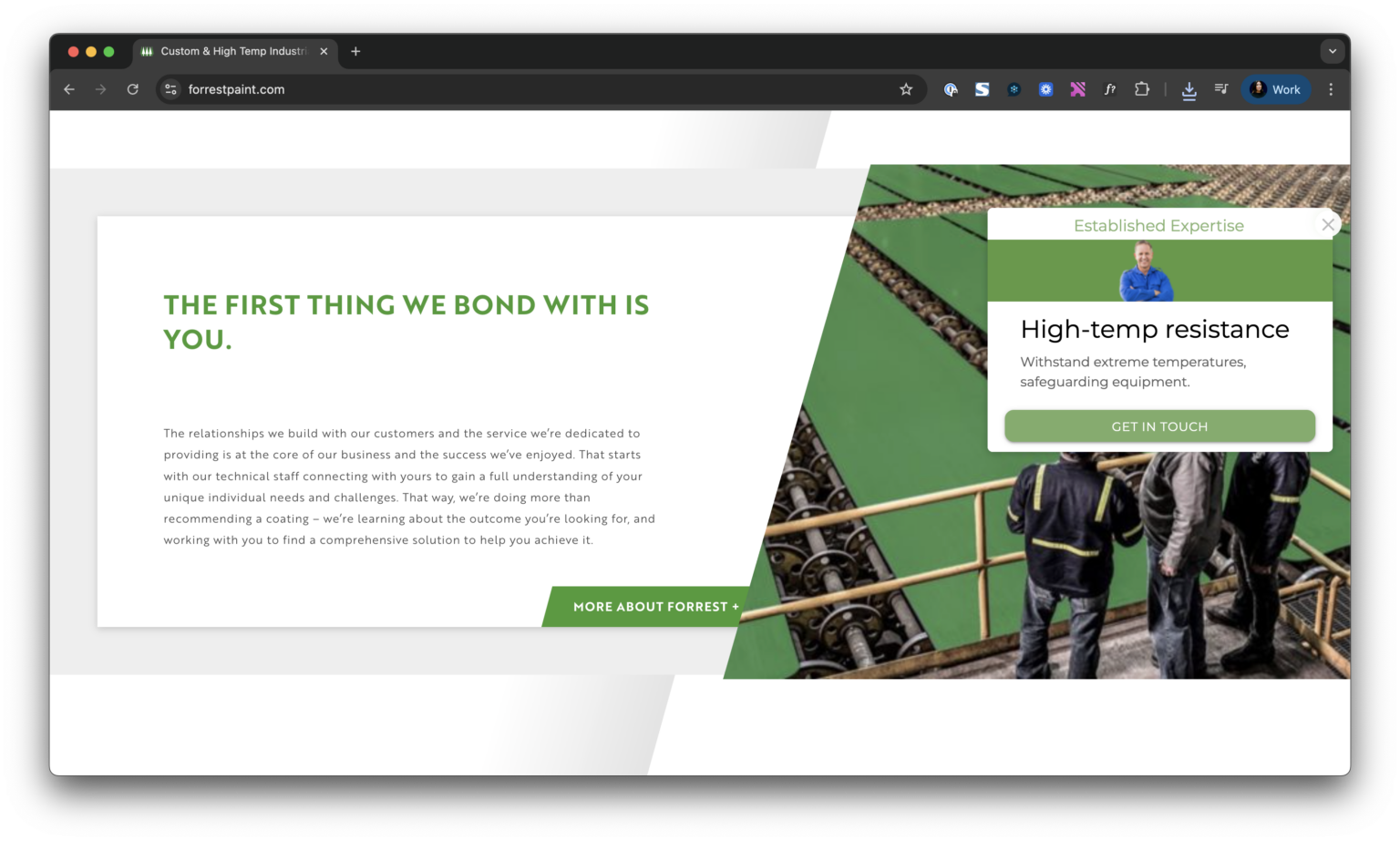
Sales requests: Forrest Technical Coatings
Forrest Technical Coatings, a B2B manufacturer of industrial coatings, had steady traffic, few sales requests, an outdated site and no developer resources. The conversion event was a submitted sales request. Pathmonk ran on a 50/50 split against a control group, and exposure was later raised to 75% of traffic.
Over the six-month period, the conversion rate was 1.49% in the control group and 2.43% with Pathmonk enabled, a 63% increase, with 169 incremental sales requests attributed to Pathmonk. The case study also reports a 303% surge in sales requests in the first seven days. Treat a first-week figure in any case study as an early signal, since a week is a small sample.
By the rule of thumb from earlier, a difference of that size on a 1.49% base needs about 2,700 visitors per group (16 × 0.0147 ÷ 0.0000884). Large effects can be proven on moderate traffic. Small ones cannot.
Bookings: Yapa Explorers
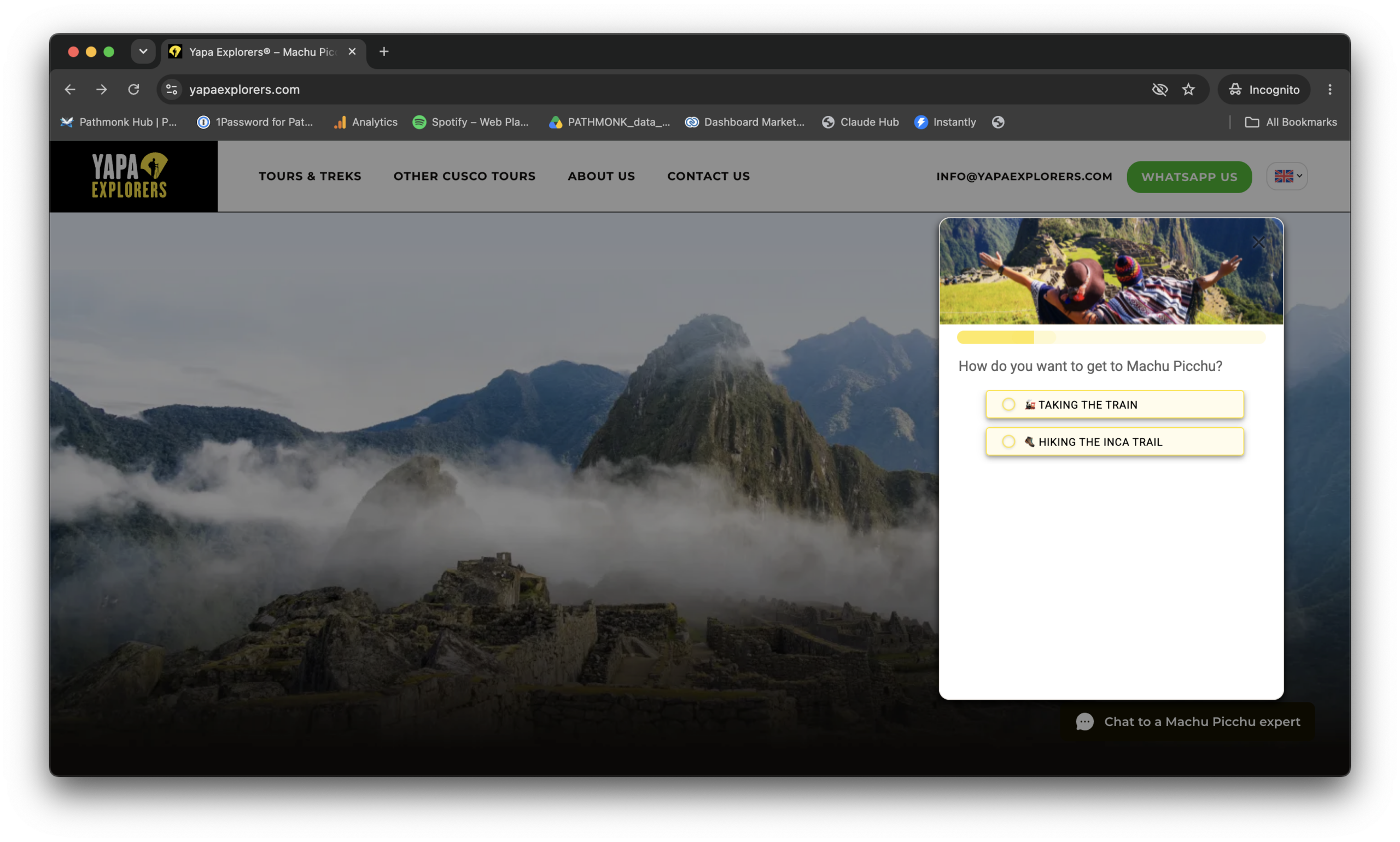
Yapa Explorers, a Machu Picchu tour operator, had visitors with strong intent who stalled on a complex choice between tours. The conversion event was a completed booking. Half of the traffic saw the standard website and half was guided by a Product Selector and intent-based microexperiences, with both groups drawn from the same sources over the same four-week window.
The booking rate was 4.06% in the control group and 5.05% in the Pathmonk group: 24% more trips booked, or 29 incremental bookings in 30 days. Revenue is reported separately and should be read separately: revenue per visitor was $40.45 in the control group and $44.72 in the Pathmonk group, a 10.55% revenue uplift, tracked with a revenue pixel on completed bookings. The case study explains the gap between the two: many of the extra bookings came through Yapa’s more accessible tours.
Neither page publishes the number of visitors in each group. Ask for it whenever you are shown a case study, including these two, and run the sample size rule on the answer.
Which type fits you and what to ask in a demo
Three questions, asked in order, place most sites in a category. They mirror the framework: can you see the problem, can a page carry a test, and do your visitors differ enough to need different treatment.
The path is run per conversion event, so mixed answers are normal. An online store with 400,000 monthly visits may run a testing platform on checkout, where the traffic concentrates, and a decision engine across category and product pages, where it does not. A B2B site with 60,000 monthly visits and a demo request as its event will usually fail the second question on every page except the homepage. For a wider view of the options for stores, see the overview of e-commerce conversion optimization tools.
Once you have a shortlist, the demo is where the category claims get tested. Eight questions cover it.
- Question 1Which single conversion event are your results measured on?
- Question 2What exactly does the AI decide, and what does my team still decide?
- Question 3How many monthly visits does it need before results are reliable on a site like mine?
- Question 4Is lift measured against a control group, on the same dates and traffic sources?
- Question 5How large were both groups, and who controls the split?
- Question 6How long until visitors see a change, and how long until the lift is proven?
- Question 7What does it not do, and which tools would I still need?
- Question 8Who on my team operates it, and for how many hours a week?
Three of them do most of the work. Question 1 stops a vendor from blending events. Question 4 separates evidence from attribution. Question 7 is the one vendors like least and the one that tells you what your stack looks like afterward. For the budget side of the decision, the article on whether conversion rate optimization is worth the investment shows how to build the business case from the same single event.
When you do not need an AI CRO tool at all
A tool multiplies a working funnel. It does not create one. In these situations the money is better spent elsewhere first:
- Traffic is too low. Below roughly 10,000 visits a month, no category can learn or prove anything in a useful time. Improve the page by hand and invest in acquisition.
- The basics are broken. Conversion tracking that misfires, a slow page, a form that fails on mobile or a checkout error will cost more conversions than any tool recovers. Fix them, then measure again.
- The problem is the traffic, not the website. If paid campaigns bring visitors who were never going to buy, optimizing the page changes little. Work through whether a low conversion rate comes from traffic quality or the website before buying anything.
- The problem is the offer. Price, product fit and delivery terms sit outside what a conversion tool can change.
- You are already at a healthy rate for your sector. Check the conversion rate benchmarks by industry. If you are well above them, the remaining headroom may not cover a tool.
- Nobody agrees on the conversion event. Without one agreed event, no vendor’s result can be judged, and no trial will end in a decision.
If none of these apply, and your site sits between 50,000 and 500,000 monthly visits with paid traffic arriving on many pages, the fourth category is usually the first one worth shortlisting, with a testing platform reserved for the one or two templates that carry enough traffic to use it.
Key takeaways
- AI CRO tools do one of four jobs: analyze behavior, generate variants, allocate traffic, or decide in real time what each visitor sees.
- Pick one conversion event before any demo: a purchase, a demo request, a booking or an appointment. Never accept a blended number.
- Traffic to the tested page, not to the site, decides whether a testing category is viable.
- Hypothetical example: detecting a 20% relative lift on a 2.0% conversion rate takes about 39,200 visitors, and a 10% lift takes about 156,800.
- Real time shortens the wait until visitors see a change. It does not shorten the wait for proof.
- A control group on the same dates and traffic sources is the only evidence that isolates the tool.
- A testing platform is the better choice for one high-traffic template and a causal question. Analytics comes first when you cannot see the drop-off.
- Below about 10,000 monthly visits, or with broken tracking or a weak offer, you do not need an AI CRO tool yet.
FAQs on AI CRO tools
What is an AI CRO tool?
An AI CRO tool is software that uses machine learning for part of conversion rate optimization. The AI does one of four jobs: it analyzes visitor behavior, generates page or test variants, allocates traffic between variants, or decides in real time what each visitor sees. The category a tool belongs to determines how much traffic and team time it needs.
How much traffic do I need for an AI CRO tool?
It depends on the category. Analytics tools work at any level. Testing tools need enough visits on the tested page to reach a sample: by a common rule of thumb, about 39,200 visitors to detect a 20% relative lift on a 2.0% conversion rate, in a hypothetical example. Real-time decision engines need enough traffic across the site to learn and to fill a control group.
Are AI CRO tools better than A/B testing?
Not in general. A/B testing is the better choice when one page or template has high traffic and you need a causal answer about a specific change. Real-time AI tools fit sites where traffic is spread across many pages and visitors arrive with different intent. Many companies use both, on different parts of the site.
How do I know the lift an AI CRO tool reports is real?
Ask what it was compared against. A before and after comparison mixes in seasonality and campaign changes, and attributed conversions include visitors who would have converted anyway. A control group that never sees the tool, measured on the same dates, the same traffic sources and one conversion event, is the only comparison that isolates the tool. Ask for the size of both groups.
Can I use an AI CRO tool together with a testing platform or analytics?
Yes. The categories do different jobs. Analytics shows where visitors drop off, a testing platform answers specific questions on high-traffic templates, and a real-time engine adapts the experience across the rest of the site. Keep one conversion event and one control group so the results stay comparable.
When is an AI CRO tool not worth it?
When monthly traffic is below about 10,000 visits, when tracking, page speed or forms are broken, when the low conversion rate comes from poor traffic quality or a weak offer, or when the team has not agreed on a single conversion event. Fix those first.
- Evan Miller, How not to run an A/B test (2010): sample size rule of thumb (evanmiller.org)
- Evan Miller, Sample size calculator (evanmiller.org)
- Analytics Toolkit, What can be learned from 1,001 A/B tests? (October 2022) (blog.analytics-toolkit.com)